
 Michael Caine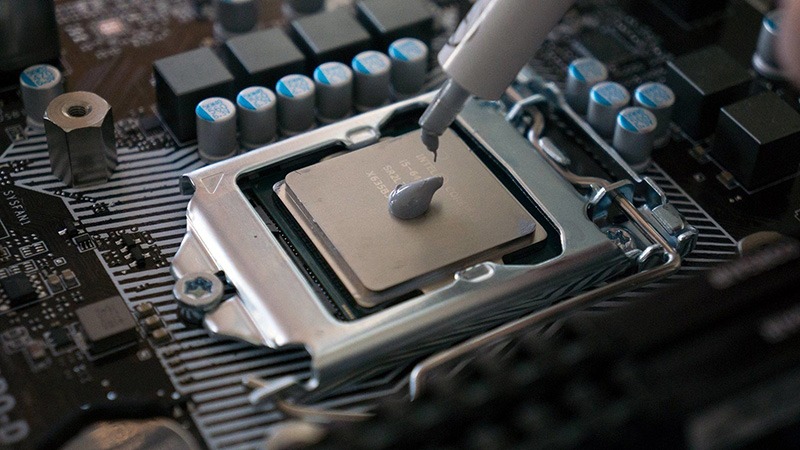
Heat problems rarely arrive as one loud failure. They long Premiere Pro export, or a late-night render that turns your desktop into a space heater. Thermal paste replacement can lower temperatures when the old compound has dried, spread poorly, or lost firm contact with the cooler, but it will not fix weak airflow, a clogged heatsink, or a cooler that was never strong enough. For U.S. PC owners trying to make a gaming rig, work laptop, or creator workstation last longer, the smart goal is not chasing the lowest number on a sensor. It is stable CPU temperature performance and GPU temperature performance under the work you do each week. The best repairs start with proof, not panic, which is why clear hardware maintenance advice for home tech users matters. A clean repaste can help. A careless one can make a good machine run hotter.
What New Paste Can Fix, and What It Cannot Touch
Fresh compound solves one narrow problem: poor heat transfer between the chip and the metal surface that carries heat away. That sounds small, but in a PC, small contact gaps can turn into loud fans, clock drops, and heat spikes. The catch is plain. Paste is only one piece in a longer heat path, and the rest of that path may be the real trouble.
A useful way to think about it is to follow the heat. It leaves the silicon, crosses the paste layer, enters the cooler, moves through fins or a radiator, then exits through case airflow. If one stage is weak, the whole chain suffers. New compound helps most when the paste layer is the weak stage, not when hot air is trapped inside the case. A small desktop in a closed TV stand, for example, may run hot even after a perfect repaste because the warm exhaust has nowhere to go. That is why a paste swap after every warm reading wastes time. A better repair starts with the symptom: sudden spikes, slow heat soak, loud fans, or clock drops. Each one points to a different weak link.
CPU heat transfer starts with contact, not magic paste
A desktop CPU sits under a heat spreader. Your cooler base presses against that spreader, and the compound fills tiny marks that metal surfaces leave behind. It is not meant to become a thick cushion. It is there to remove air pockets, because air is a poor heat mover.
That is why more paste does not mean more cooling. Too much can push the cooler and heat spreader farther apart, while too little can leave uncovered spots. Intel’s own thermal paste application guide warns about both problems, which matches what repair shops see on real machines. The best layer is boring: thin, clean, and squeezed by even pressure.
A good CPU repaste often helps most on systems that already had a decent cooler. Think of a five-year-old gaming desktop in Texas, sitting under a desk near carpet, used for Warzone, streaming, and weekend video edits. If the cooler still works and the case is not choked with dust, new compound may calm sudden spikes and bring fan noise down. If the cooler is a thin stock unit on a hot chip, paste will not turn it into a tower cooler.
GPU gains depend on age, pressure, and card design
Graphics cards are less forgiving than desktop CPUs because the cooler covers more than the GPU die. It may touch memory chips, voltage parts, pads, brackets, and a backplate. One screw pattern can change the pressure across the whole card. That is why GPU temperature performance can improve after a repaste, yet also get worse when pads shift or screws tighten unevenly.
A used RTX card bought from a local Facebook Marketplace seller is a common example. The card may pass a quick test, then hit high hotspot readings during a long gaming load. The paste under the GPU die may have pumped away from the center after years of heat cycles. In that case, fresh compound and even mounting pressure can help the hotspot more than the average core temperature.
The odd part is that the headline temperature may move less than expected. A GPU can report a core temperature that looks fine while the hotspot is much higher. That spread tells a better story than one number. A repaste that cuts hotspot spread can reduce fan spikes even when the main GPU reading changes only a few degrees. Less drama, better play. That is a win most owners notice fast in daily use.
Thermal Paste Replacement Impact Under Real CPU and GPU Loads
The only useful test is the one that matches your machine’s actual work. A gaming desktop, a small office PC, a student laptop, and a creator workstation do not fail in the same way. Chasing one online temperature target can send you toward the wrong fix, because room temperature, case layout, cooler size, and power limits all shape the result.
This is where many home repairs go sideways. Someone sees a Reddit screenshot, compares it to their own PC, and assumes the paste is bad. But the other system may sit in a 68°F basement with a larger case and higher fan speed. Your room, workload, and cooling layout are part of the test. Use a simple monitoring app, save screenshots, and write down the room condition. You do not need a lab bench. You need the same test twice, with fewer variables between runs.
What to test before opening the case
Start with a baseline. Record room temperature, idle readings, a 10-minute gaming load, and a heavier load such as a render, compile, or stress test. Use the same fan profile before and after the repaste. A change in fan speed can hide the truth, because lower temperatures may come from louder fans rather than better contact.
For CPU temperature performance, watch clock speed and power draw beside temperature. A chip that holds higher clocks at the same fan noise has improved, even if the temperature drop is modest. Modern processors often boost until they meet a heat, power, or voltage limit, so better cooling may show up as steadier speed rather than a dramatic sensor drop.
For a GPU, compare core temperature, hotspot, fan speed, and clock stability. A card that drops from 86°C to 80°C sounds good, but the better result may be a hotspot spread shrinking from a scary gap to a sane one. That is the kind of change you feel as fewer frame-time stutters and less fan hunting. It also keeps the repair tied to how the PC behaves, not how a single graph looks.
Why idle temperatures often lie
Idle readings get too much attention because they are easy to see. They are also easy to misread. Windows background tasks, browser tabs, RGB control software, game launchers, and antivirus scans can wake a chip for a few seconds and make the number jump. A machine that idles at 45°C is not broken by default.
Load temperature tells the truth. A Los Angeles video editor rendering 4K footage for half an hour learns more from that run than from staring at idle numbers in a monitoring app. The cooler, paste, case fans, and room air all settle into a pattern. Then you can compare. If the same export finishes with less fan noise and steadier clock speed, the work paid off.
The counterintuitive point: a successful repaste may raise idle temperature a touch while improving load behavior. That can happen after a fan curve reset, a BIOS change, or better boost behavior. The machine may allow the chip to wake harder because it now handles heat better under pressure. Do not judge the work from one idle screenshot.
How to Repaste Without Making Temperatures Worse
The repair is simple in concept and easy to rush. Remove the cooler, clean the old compound, apply new material, and remount. The risk sits in the details: dirt on the surface, too much paste, poor screw order, damaged pads, or a cooler that does not sit flat when you close the case.
Slow work wins here. Set aside a clean table, good light, and enough time that you are not hurrying before dinner. Keep pets away from the work area. One cat hair on a chip surface is not a disaster, but it tells you the space is fighting you. The point is not perfection. The point is to remove the sloppy variables that make a clean repair look bad afterward.
Thermal compound application mistakes that raise heat
Good thermal compound application begins before the tube opens. Power down, unplug, ground yourself, and give the machine time to cool. Use high-percentage isopropyl alcohol and lint-free material for cleaning. Coffee filters work well in a pinch because they do not shed like tissue.
For most desktop CPUs, a small center dot works because cooler pressure spreads the compound. Larger heat spreaders may need a slightly different pattern, but the purpose stays the same: full contact without a thick layer. Thermal compound application should feel controlled, not artistic. You are not frosting a cupcake.
The screw pattern matters more than many beginners expect. Tighten in a cross pattern, a bit at a time, so pressure lands evenly. On a tower cooler, check that the fan cable is clear and the heatsink is not leaning. On a small-form-factor PC, confirm that side panels do not press against the cooler after reassembly. A perfect paste layer cannot fix a cooler tilted by a cable or bracket.
Laptop and graphics card risks most guides skip
Laptops bring tighter spaces and more fragile parts. A gaming laptop from Best Buy may share one heat pipe assembly across the CPU and GPU. Lift that assembly wrong and you can bend a pipe, tear a fan cable, or disturb thermal pads on memory chips. The repair is no longer only about paste.
Graphics cards add another trap: thermal pads are not all the same thickness. If you replace a pad with one that is too thick, the cooler may sit high and lose contact with the GPU die. If the pad is too thin, memory cooling may suffer. Paste gets blamed, but pad thickness caused the failure.
Take photos before removing parts. Keep screws in order. If a card has a warranty sticker, know the risk before you break it. For many U.S. buyers, a manufacturer warranty or store protection plan is worth more than a few degrees, especially on newer GPUs that cost as much as a used commuter car payment. If the machine is still covered, ask whether service can handle the work without risking your claim.
Deciding Between Paste, Dust, Airflow, and Better Hardware
A repaste should sit inside a maintenance decision, not become the first answer to every warm reading. Heat travels from chip to paste, paste to cooler, cooler to air, and air out of the case. Any weak part in that path can dominate the whole result. Fix the biggest restriction first.
This mindset saves money. It also saves parts. People damage fan headers, strip screws, and bend fins because they open hardware before checking the easy causes. A careful temperature log and a flashlight can prevent an expensive mistake. This also keeps expectations sane. Paste is cheap, but the labor can be risky on laptops and GPUs. If the likely gain is tiny, cleaning and airflow changes may be the smarter weekend project.
When dust and airflow beat new paste
Dust is boring, so people skip it. Then they replace paste while a felt-like blanket sits between the fan and heatsink fins. That is backwards. A dusty cooler cannot dump heat into moving air, no matter how well the chip touches the cold plate.
A Phoenix gaming PC on the floor can collect dust fast, especially in homes with pets. Cleaning filters, front intakes, radiator fins, and GPU heatsinks may drop load temperatures more than new compound. It also protects fan bearings and power supply intake paths. A good PC cooling maintenance checklist should begin with air before it asks you to remove a cooler.
Airflow can also explain why the side panel test matters. If temperatures fall sharply with the side panel off, the case is starving for air or trapping heat. A repaste may still help a little, but the real fix may be a front intake fan, cable cleanup, or moving the tower away from a closed cabinet. The cheapest test is often the most honest one.
When cooler pressure, pads, or old parts are the real cause
Sometimes the old paste is innocent. A loose cooler bracket, dried pump in an all-in-one liquid cooler, warped mounting frame, or tired laptop fan can create the same symptoms. The clue is pattern. If temperatures climb fast and never settle, contact may be poor. If they rise slowly over twenty minutes, heat may be building inside the case.
GPUs can suffer from paste pump-out, where heat cycles and mounting pressure push compound away from the die over time. That issue is common enough on some cards that a repaste can help, yet the lasting fix may require a better compound type, careful screw pressure, or pad inspection. For a laptop, a gaming laptop upgrade guide should treat paste, pads, fan cleaning, and power limits as one job.
The non-obvious truth is that lower temperatures are not always the best end goal. A quieter fan curve at safe temperatures may matter more than winning a sensor screenshot. For a work-from-home accountant in Ohio, stable spreadsheets and low noise may beat shaving four degrees off a CPU peak. Performance is personal when the machine sits beside you all day.
Conclusion
A smart repaste is not a ritual. It is a targeted repair for a contact problem, backed by before-and-after testing and a clear reason to open the machine. The best results show up when old compound has dried out, the mount was poor, or a GPU hotspot spread has grown too wide. Weak airflow, dust, bad pads, and tired coolers need different fixes.
For most U.S. PC owners, the best path is simple: record load behavior, clean the cooling path, inspect the mount, then repaste only when the evidence points there. Thermal paste replacement can improve heat transfer, noise, and clock stability, but it should never become a blind habit. Treat your CPU and GPU like parts of one cooling system, not separate mysteries. That mindset keeps repairs practical, protects expensive hardware, and stops you from chasing meaningless sensor drama. Do the careful work once, test it under your real workload, and keep the machine running in the range where it feels fast, calm, and dependable.
Frequently Asked Questions
How much can new thermal paste lower CPU temperatures?
A healthy desktop may only drop a few degrees, while an older system with dry compound can improve more. The best sign is not one peak number. Look for steadier clocks, lower fan noise, and better load behavior under the same room temperature and fan settings.
Is it worth repasting a GPU for gaming?
It can be worth it when hotspot readings are high, fans surge, or the card is several years old. Newer cards under warranty deserve caution. A shifted thermal pad or uneven cooler mount can erase the benefit and create memory cooling problems.
How often should I replace thermal paste on a desktop CPU?
Many desktop systems do fine for years without fresh compound. Check load temperatures after the three-to-five-year range, after cooler removal, or when fan noise rises without another clear cause. Replace it because the data changed, not because a calendar date arrived.
What temperature drop should I expect after repasting a laptop?
Laptop results vary widely because dust, shared heat pipes, fan wear, and power limits all matter. A clean, careful job may reduce heat and fan noise, but a thin chassis can still run warm by design. Test with the same game or workload before comparing.
Can too much thermal paste make temperatures worse?
Yes. A thick layer can reduce metal-to-metal contact and may spill around the socket or board. Most desktop CPUs need a modest amount that spreads under cooler pressure. The goal is thin coverage that fills surface gaps without becoming a pad.
Should I clean dust before changing thermal paste?
Yes. Dust removal should come first because blocked fins and filters can cause higher temperatures even when the paste is fine. Clean fans, heatsinks, filters, and intake paths, then test again. The result may save you from opening the cooler.
What is the safest way to test CPU and GPU heat after repasting?
Use the same workload, same fan curve, and similar room temperature before and after the work. Track temperature, fan speed, clock speed, and power draw. A ten-to-thirty-minute gaming or render test gives better evidence than a quick idle check.
Do expensive thermal compounds always perform better?
No. Better compounds can help, but application, cooler pressure, and surface contact often matter more. A midrange paste applied well can beat a premium paste applied poorly. Choose a known, non-conductive compound unless you have repair experience and a clear need.