 Michael Caine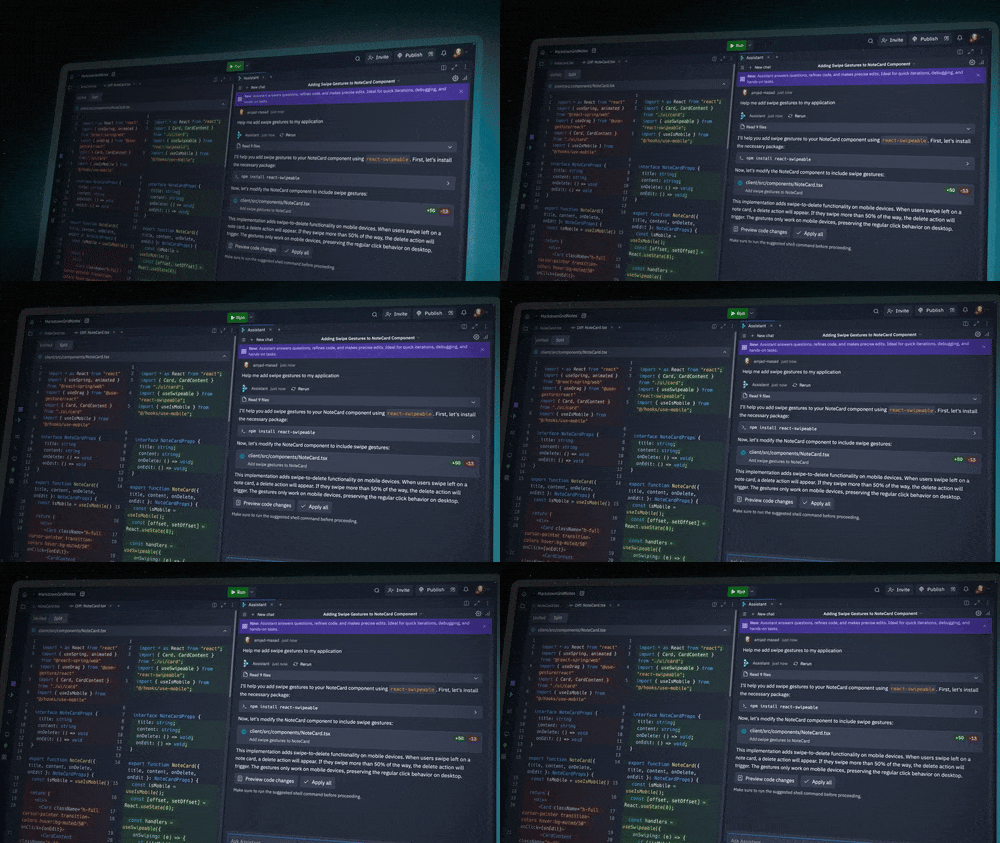
A bakery owner, a realtor, a local coach, and a school volunteer may all have the same hidden problem: they need software, but they do not speak software. The promise behind an AI Coding Agent is simple enough to sound suspicious: describe the app, answer a few follow-up questions, and watch a working version take shape. For non programmers in the USA, that changes the starting line. You no longer need to begin with JavaScript syntax, Git commands, or server setup. You begin with the job the app must do.
That does not mean magic. It means a tool like Replit Agent can translate plain requests into code, files, screens, database pieces, and deployment steps. A good builder still needs judgment. You must know the customer, the workflow, the mistake that would cost money, and the point where a prototype becomes risky. For readers comparing AI tools, practical software growth resources can help frame the bigger business decision, not only the tech choice. The real question is not whether non programmers can build. They can. The better question is what they should build first, and where they still need human review.
Why Plain Language App Building Feels Different From Old No-Code Tools
For years, no-code tools promised freedom from programming, but many of them replaced code with another maze. You still had to learn dashboards, logic blocks, form rules, plugins, tables, permissions, and strange menu names. That helped patient users, but it did not feel natural to a small business owner who wanted a customer intake tool by Friday.
Replit Agent changes the feeling because the first move is conversation. You can say, “Build me a pet grooming booking app with customer profiles, appointment slots, and email reminders,” then refine what appears. The friction moves from “where is the button?” to “did I explain the business clearly?” That is a better kind of friction.
How natural language turns rough ideas into working screens
The biggest gift for non programmers is not speed. It is momentum. A blank editor stops most people before they begin. A chat prompt lowers the emotional cost of starting. You describe the rough version first, then the agent creates a structure you can react to.
Take a local tutoring business in Ohio. The owner might ask for a simple app where parents request sessions, choose grade levels, and see available times. The first version may not be perfect. The form labels may need cleaner wording. The schedule logic may miss a rule for holidays. Still, the owner can click through a working draft and say, “No, parents should choose the subject before the date.” That is progress.
This is where no-code app development becomes less about building from blocks and more about directing an assistant. You are not removed from the work. You are moved into a role that many nontechnical founders understand better: deciding what the product should do for real people.
The counterintuitive part is that vague ideas often become useful faster when they become visibly wrong. A flawed screen gives you something to argue with. A perfect plan in a notebook can hide weak thinking for weeks.
Why the best prompts sound like business rules, not tech requests
Many beginners try to sound technical because they think the tool expects it. That can hurt the result. “Make a React dashboard with backend auth” may be less useful than “Create a dashboard where a store manager can see today’s orders, mark them packed, and flag refunds.” The second request explains the work.
Building applications without coding starts with plain business rules. Who uses the app? What are they trying to finish? What should happen when something goes wrong? What information should never be public? These details matter more than naming a framework.
A Texas food truck owner does not need to ask for a “database schema.” They can say, “Customers should preorder tacos, choose pickup time slots, and receive a confirmation. I need to close ordering once we hit 80 orders for lunch.” That tells the agent what the app must protect: time, inventory, and customer trust.
The odd lesson is that non programmers may sometimes write better first prompts than junior coders. They are closer to the pain. They know the refund call, the angry customer, the missing spreadsheet row. When that knowledge enters the prompt, the app has a fighting chance.
What AI Coding Agent Capabilities Actually Help Non Programmers Do
The phrase sounds broad, so it helps to break it down into actions. For a nontechnical builder, the useful parts are not abstract. They are the ability to create screens, connect data, explain code, fix errors, preview changes, and publish a usable version without stitching together ten services.
This is where Replit Agent feels closer to a junior technical partner than a template picker. It can draft the app, make edits, respond to feedback, and work inside an environment where code, preview, data, and deployment live near each other. That closeness matters because tool switching is where beginners lose confidence.
Turning a simple prompt into front end, back end, and database pieces
A useful app is rarely only a pretty page. Even a small client portal may need login, stored records, form validation, admin views, and a way to edit mistakes. Replit Agent can help generate those layers from a prompt, then adjust them as you test the app.
Think about a home cleaning company in Florida. The owner may want a quote tool that asks for ZIP code, number of bedrooms, pets, preferred date, and add-on services. A thin website form is easy. A better app stores quote requests, lets staff mark follow-ups, and keeps old customer notes. That crosses from page design into workflow.
Replit Agent can help a nontechnical user see those layers side by side. The screen is what customers touch. The back end handles rules. The database remembers what happened. Once you understand that split, you make better requests, even without reading code line by line.
Here is the quiet catch: the agent may build more than you meant to own. Every saved customer field becomes a responsibility. If you ask for birthdays, addresses, notes, and payment-related details, you now have a privacy problem, not only a feature.
Debugging becomes a conversation, but testing still belongs to you
Old software errors can feel hostile. A red stack trace looks like a locked door. An agent can explain the error in plain language, suggest a fix, and apply changes. For non programmers, that is a huge shift. You can say, “The submit button does nothing after I fill the form,” and the agent can inspect the likely cause.
That does not remove the need for testing. It changes what testing looks like. You click like an impatient customer. You enter a fake phone number. You leave a required field blank. You try the app on your phone. You ask a friend to break it.
For example, a gym owner in Arizona may build a membership check-in app. It works with one test member, then fails when two people have the same last name. A coder might spot that early. A non programmer catches it by acting out the front desk moment. That kind of testing is not second-class work. It is product work.
The non-obvious truth is that beginners often test in a more honest way than developers. They do not admire the code. They press buttons and expect the thing to behave. That impatience can save the app.
Where Replit Agent Fits in a Real Small Business Workflow
The best use case is not “build the next billion-dollar platform alone.” That headline gets clicks, but it sets the wrong expectation. The strongest fit is the boring app that saves labor, removes spreadsheet chaos, or proves a product idea before a large spend.
For many local American businesses, that is enough. A rough internal tool can replace a messy Google Sheet. A client intake app can reduce back-and-forth emails. A simple calculator can qualify leads while you sleep. The value comes from removing a repeated headache.
Start with internal tools before public customer apps
Internal tools are safer places to learn. The audience is smaller. Mistakes are easier to spot. The brand risk is lower. If a staff checklist app needs three revisions, no customer sees the rough edges.
A small roofing company in Pennsylvania might start with an inspection tracker. The app lets field staff enter roof age, photos, leak notes, and follow-up priority. It does not need to win design awards. It needs to stop details from disappearing in text messages.
This is where no-code app development through an agent can beat waiting for a custom software quote. The owner can build a first version, test it with two employees, and learn what matters. Maybe photo upload is key. Maybe offline access matters more. Maybe the real need is a daily job board, not an inspection archive.
The counterintuitive move is to avoid your dream app at first. Build the dull tool. Dull tools reveal workflow truth. Dream apps attract feature wish lists.
Use the agent for prototypes, then decide what deserves expert review
A prototype is not a toy. It is a question made clickable. Does the intake flow make sense? Do customers understand the offer? Does the admin screen show the right data? Replit Agent can help answer those questions before you hire a developer or commit months to an idea.
That said, public apps need a higher bar. Anything involving payments, private customer data, health information, school records, legal documents, or employee records deserves expert eyes. The agent can create a strong first pass, but review protects you from hidden risk.
A boutique real estate team in Colorado might use Replit Agent to prototype a lead-matching tool for buyers. That is a good experiment. But once the app stores client budgets, contact details, and private notes, the team should bring in technical help for security, access control, and data handling.
For deeper planning around app scope and content strategy, you can connect this process to small business digital planning and AI tool selection for startups. The app is only one part of the system. Training, support, privacy, and maintenance decide whether people keep using it.
The Limits Non Programmers Must Respect Before Publishing
The new power is real, but so are the traps. A tool that makes software easier can also make bad software easier. Non programmers need a clear line between “good enough to test” and “safe enough to trust with real users.”
That line depends on data, money, access, and harm. A public recipe organizer has a low failure cost. A patient reminder app does not. A local event RSVP page is one thing. A payroll approval tool is another. The more the app can affect privacy, finances, or legal duty, the more review it needs.
Security is not a setting you add at the end
Security starts with what you ask the app to collect. Many nontechnical builders request too much data because fields feel free. They are not free. Each field adds storage, risk, and future cleanup.
A youth sports coach may build a team availability app. Names and practice dates might be fine. Home addresses, medical notes, and private family details raise the stakes fast. Before publishing, ask: Do I need this information? Who can see it? How long should it stay? What happens if the wrong person opens it?
The U.S. Cybersecurity and Infrastructure Security Agency has pushed secure software thinking through guidance such as Secure by Demand questions for buyers. Non programmers can borrow that mindset. Ask hard questions before trust is assumed.
The uncomfortable insight is that a small app can create grown-up risk. Size does not protect you. A five-page tool with exposed customer records is still a serious problem.
Cost, ownership, and maintenance matter after the first launch
The first working version feels like the finish line. It is not. Apps need updates, bug fixes, usage checks, data cleanup, and sometimes paid hosting or database resources. Replit keeps many pieces close together, but you still need to understand what happens when people start using what you built.
This matters for USA small businesses with thin margins. A prototype used by three staff members may cost little. A public app with steady traffic, stored data, and background tasks may need a paid plan or usage-based resources. That is normal. The mistake is treating software as a one-time file instead of a living service.
Maintenance also includes plain ownership questions. Who has the login? Where are backups? Can you export code and data? What happens if the person who created the app leaves? These are not dramatic questions. They are Monday morning questions.
Building applications without coding works best when the owner stays calm about the boring parts. Keep a change log. Test before sharing big updates. Use fake data while experimenting. Save prompts that produced good results. When something breaks, describe the exact steps that caused it.
Conclusion
Non programmers now have a practical path from idea to working software, and that shift deserves attention. Replit Agent does not turn every business owner into an engineer, but it can turn hidden operational knowledge into a usable first version. That is a big deal for local teams that have been priced out of custom software or stuck in spreadsheet workarounds.
The smartest builders will not treat an AI Coding Agent as a magic employee. They will treat it as a fast technical draft partner. They will start with small internal tools, test with real workflows, cut data they do not need, and bring in expert help when risk rises. That balance is where the value lives.
The future of app building will not belong only to people who write code. It will belong to people who can explain problems clearly, test honestly, and know when a tool has gone far enough. Start with one painful workflow, build the smallest useful version, and make it earn the next feature.
Frequently Asked Questions
Can non programmers build real apps with Replit Agent?
Yes, non programmers can build working prototypes and simple apps by describing what they want in plain language. The strongest results come from clear business rules, patient testing, and small scopes. Public apps with sensitive data still need technical review before launch.
Is Replit Agent better for websites or full applications?
It can help with both, but simple web apps are often the better starting point. A landing page is easier, while a full application needs data storage, user roles, testing, and maintenance. Start with a small workflow before adding heavier features.
What should I ask Replit Agent to build first?
Start with an internal tool that solves a repeated problem. Good examples include intake forms, quote trackers, booking dashboards, checklists, inventory logs, or lead sorting tools. These projects teach you how the agent works without exposing customers to early mistakes.
Do I need to understand code to use Replit Agent?
You do not need to write code at the start, but basic awareness helps. Learn what front end, back end, database, login, and deployment mean. Those terms help you ask better questions and spot when the app is doing something risky.
Can I publish an app built with Replit Agent?
Yes, you can publish apps, but publishing should come after testing. Check forms, login flows, mobile screens, database behavior, and error cases. For apps involving payments, private records, or regulated information, get a qualified developer or security professional to review it.
What are the biggest risks for beginners using AI app builders?
The biggest risks are collecting too much data, publishing before testing, trusting generated code blindly, and misunderstanding costs. Beginners may also forget access controls. A simple rule helps: if a mistake could hurt a customer, slow down and get review.
How can I write better prompts for app building?
Write prompts like instructions to a careful assistant. Name the users, the steps, the data, the rules, and the failure cases. Instead of asking for a “dashboard,” describe who opens it, what they need to see, and what action they take next.
Is no-code app development still useful if AI can write code?
Yes, because the real job is not only code creation. You still need workflow design, testing, privacy choices, and user feedback. AI can speed up the build, while no-code thinking helps nontechnical people shape the app around human tasks.