

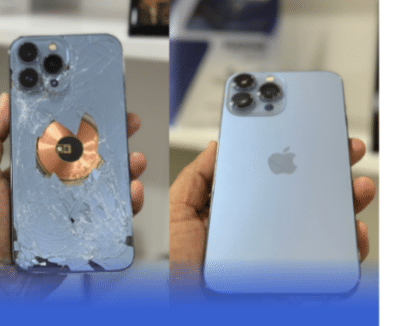
A cracked screen or a phone that won’t charge cuts you off from calls, photos and work apps. Handing that phone to someone else can feel uneasy when you don’t know what happens next. A professional repair follows a clear order. The technician checks the phone, finds the real fault, gives you a price to approve, makes the repair and tests everything before you leave. Most simple repairs may take 20 to 30 minutes with professional cell phone repair in NW Calgary but that varies based on different factors.
Key Takeaways
- A professional repair moves through six steps: inspection, diagnostics, a quote you approve, the repair itself, testing and a final check with you at pickup.
- Nothing is replaced until the actual fault is confirmed and you agree to the price. Samsung screen replacements in Calgary usually cost about $110 to $650.
- Many repairs take 20 to 30 minutes while you wait. Screen and battery jobs are usually done within a few hours, while water damage takes longer.
- Back up your phone, remove your SIM and SD cards, and use available privacy features before the visit. Test the repaired functions at the counter before leaving.
The prices in this blog are general ranges and not a final quote. Your exact price is confirmed after the technician inspects your phone.
What Does the Professional Cell Phone Repair Process in NW Calgary Look Like?
The process follows the same order for most phones and most faults. Each step has a clear purpose. Knowing them helps you ask the right questions and tell a careful repair shop from a rushed one.
1. Initial Phone Inspection and Problem Assessment
The visit starts at the counter. The technician asks what went wrong and when it started. A drop, contact with water, a recent software update or an earlier repair all point the check in a different direction.
Then comes a quick visual check of the screen, frame, back glass, buttons and ports. Your phone details and the reported problem go on a work order. Keep that number. Any warranty claim later is tied to it.
2. Professional Diagnostics to Identify the Actual Issue
A good shop diagnoses first and quotes after. That matters because the same symptom can come from very different faults:
- A phone that won’t charge may have lint packed in the port, a worn port or a failing battery.
- A black screen can mean a broken display or a phone that isn’t powering on at all.
- Unresponsive touch can indicate a damaged digitizer or display assembly, although software problems and other hardware faults should also be ruled out.
- Fast battery drain can come from a worn cell or from an app running in the background.
Finding the real cause first saves you from paying for a part you didn’t need. It also makes the problem less likely to come back a week after you’ve left the shop.
3. Repair Recommendations, Cost Estimates, and Customer Approval
Once the fault is clear, the technician explains your options based on the phone’s condition and its value. Sometimes the honest answer is that an older phone isn’t worth a major repair. No work starts until you approve the quote.
Many repairs come with more than one part option. Official service packs, premium aftermarket parts and budget parts each sit at a different price. You can also bring your own part or have the shop source one.
4. Repairing the Phone and Replacing Damaged Components
With your approval, the repair begins. The type of work depends on the fault. Every replacement part is checked before you pick the phone up.
Screen and Display Replacement
Screen work depends on what’s broken. Cracked outer glass is the cheaper fix. Ink-like stains, colored lines or a frozen touch layer usually mean the full screen assembly needs replacing. On foldables, the hinge and the inner screen are separate repairs.
Battery Replacement
A battery that drains fast, shuts the phone off early or starts to swell needs replacing. The technician removes the old cell and fits the new one. A swollen battery should be handled right away, since it can push the screen up from the frame.
Charging Port and Other Component Repairs
Some charging ports only need a careful clean. Others are worn or damaged and need replacing. The same bench work covers cameras, speakers, microphones, buttons and switches. Software problems are handled through troubleshooting rather than new parts.
Water-Damaged Phone Inspection and Repair
Water damage requires a careful internal inspection because moisture can affect connectors, circuits and other components. Corrosion may develop after liquid exposure, even when the phone looks dry. Switch the device off, avoid charging it and arrange an assessment as soon as possible.
5. Post-Repair Testing and Quality Assurance
Before the phone goes back to you, the repaired part and the functions around it are tested. A careful check covers:
- touch response and brightness across the full screen
- front and rear cameras
- the speaker and microphone on a test call
- charging port fit and charging
- the buttons, plus Face ID or fingerprint unlock where it applies
No shop can guarantee a phone keeps its original Ingress Protection (IP68) water rating once it’s been opened. It’s safer to keep a repaired phone away from water.
6. Device Collection and Final Repair Verification
At pickup, test the phone yourself with the technician at the counter. Check the screen brightness, both cameras, the speaker and the charger fit. It takes a few minutes and catches any problem while you’re still there. Keep your receipt or work order number. You’ll need it for any warranty claim.
Repair warranties vary by provider and replacement part. Ask for the written warranty terms, including coverage for defective components, workmanship issues and any exclusions for accidental or liquid damage.
How Long Does Professional Cell Phone Repair Usually Take?
Most repairs take 20 to 30 minutes. You can usually wait while the work is done. Screen and battery jobs are typically finished within a few hours, depending on the model and whether the part is in stock. A few things add time. Special-order parts can push a repair to the next day.
Water damage takes longer because each function needs testing first. Calling ahead with your exact model helps confirm the part is available.
How Much Does Professional Cell Phone Repair Cost in Calgary?
The price depends on your phone’s model, the part and how bad the damage is. Samsung screen replacements in Calgary usually cost between $110 and $650 in Canadian dollars (CAD). The range breaks down like this:
| Samsung model | Screen replacement (CAD) |
| Galaxy A-Series | $110 to $220 |
| Standard S-Series (S21 to S25) | $170 to $340 |
| S-Series Plus and Ultra | $240 to $480 |
| Galaxy Z Flip | $280 to $480 |
| Galaxy Z Fold | $450 to $680+ |
Newer flagship phones cost more to fix. Their sealed, water-resistant frames and tightly packed parts take more time and care. Battery replacements usually cost less than screens. Water damage and board-level work are priced only after diagnosis.
Are Your Personal Data and Photos Safe During Phone Repair?
Most hardware repairs, like a screen or battery, don’t touch the phone’s storage. Your photos and messages stay where they are. Still, any repair carries a small risk. A recent backup is the only real safeguard for files you can’t replace.
If the phone won’t turn on and the data matters, say so at check-in. Data recovery is a separate service. It should be discussed before any repair begins so nothing is done that makes recovery harder.
How Should You Prepare Your Phone Before Taking It for Repair?
A few minutes of prep makes the visit faster and keeps your personal information private:
- Back up photos, contacts and messages to the cloud or a computer.
- Remove the SIM card and any SD card.
- Keep your device passcode private. If testing requires device access, ask whether you can unlock the phone yourself while remaining present or use an available repair privacy feature.
- Back up your data before the appointment. Only consider a factory reset if the repair provider explains why it is necessary and you have confirmed that your important files are safely backed up.
- Note your exact model and storage size.
- Write down when the problem started and what happened just before it.
Conclusion
Understanding the repair process helps you know what to ask, what to expect and how to check the finished work. A clear diagnosis, an approved estimate and proper post-repair testing are important parts of a well-managed repair appointment.
Most jobs take 20 to 30 minutes. Water damage and special-order parts take longer. Knowing the steps ahead of time helps you ask the right questions at each stage.
Before the visit, back up your phone and remove the SIM card and passcode. Afterward, keep your work order number for the warranty. Those simple habits make cell phone repair in NW Calgary quick and stress-free.